
Messages: SMS & Text App
Ai Photo LabsCommunication
4.652.00 Reviews
- Version
- 2.7.0
- Installs
- 100.00K
- Age Rating
- Everyone
Screenshots
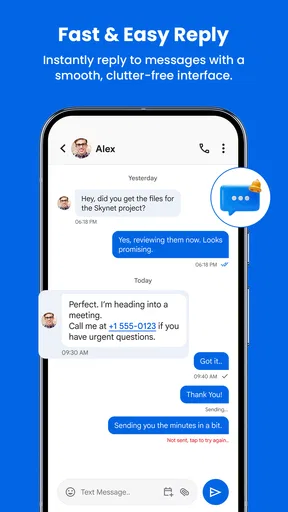
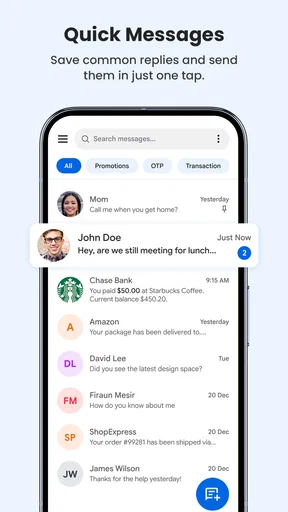
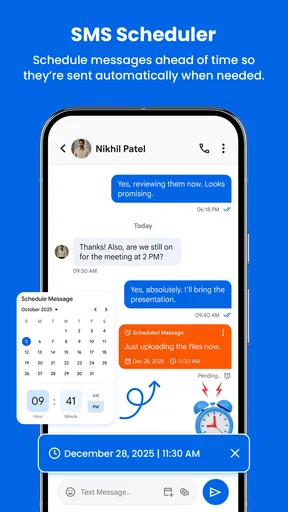
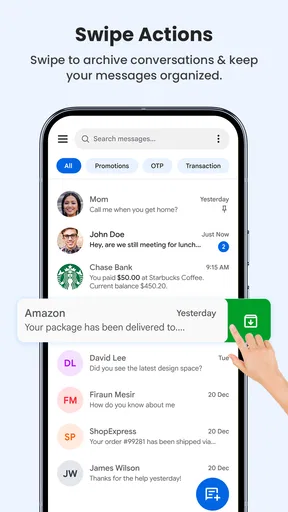
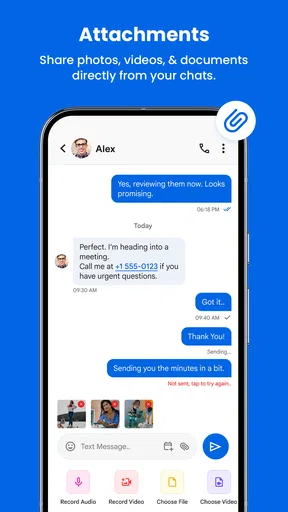
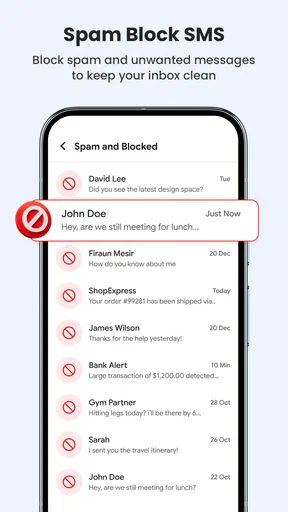
Our Review of Messages: SMS & Text App
 Analysis by Appyee
Messages: SMS & Text App is the kind of communication tool I would consider when the default texting experience on an Android phone feels cluttered or difficult to manage. It focuses on ordinary SMS conversations rather than trying to become a complete social platform, and that narrower purpose is part of its appeal. I found the idea most useful for people who want quick access to text messages, a cleaner way to sort conversations, and a practical backup option without paying for the app.
Developed by Ai Photo Labs, the app is listed in the Communication category and is available free of charge. Its audience is broad because the content rating is Everyone, while the minimum operating system is Android 8.0. The current release is version 2.7.0, so users with older phones may still be able to try it, provided their device meets that system requirement.
The app has reached over one hundred thousand installs and holds a 4.6 average from more than eight hundred ratings, with a little over fifty written reviews. Those figures suggest that the basic experience works well for many people, but they should not be mistaken for a guarantee that every phone will behave identically. Texting apps depend heavily on the phone’s Android version, carrier, SIM setup, and default-app settings.
Where the first problems usually appear
The most common difficulty with an alternative SMS app is not writing a message. It is getting the phone to treat the new app as the place where messages should be read and sent. Android normally expects one application to act as the default SMS handler. If that handoff is incomplete, a user may see conversations in one app while incoming texts still appear elsewhere, or a message may seem delayed because notifications belong to the previous application.
I would begin by opening Messages: SMS & Text App and following its initial prompts carefully instead of dismissing them quickly. If Android asks which app should handle SMS, I would select this one only after checking that I actually want it to become the main texting app. Switching back later is possible through the phone’s application settings, but the exact wording and menu location can vary between manufacturers.
Another point that can confuse new users is the difference between an existing conversation and a new message. A conversation may already contain older texts stored on the phone, while a new message depends on the active SIM, mobile service, and the recipient’s number. If an old thread appears but a fresh text will not send, that does not automatically mean the app failed. It may indicate a service or account issue outside the interface.
I also recommend checking whether notifications are enabled after installation. A communication app can be functioning correctly while alerts are muted by Android, a focus mode, a battery-saving setting, or a manufacturer’s background-management system. This is especially important on phones that aggressively restrict apps when the screen is off.
The first useful distinction is whether the problem affects the conversation list, notifications, or sending. Separating those three symptoms prevents a lot of unnecessary reinstalling. A missing alert points toward notification settings; a failed send points toward service, SIM, or carrier conditions; an empty-looking inbox may relate to the selected account, storage, or migration process.
Checks I would make before blaming the app
Before changing anything significant, I would confirm that the phone has mobile signal and that the correct SIM is active if the device supports more than one. SMS messages are tied to the phone’s cellular service, so Wi-Fi alone does not necessarily solve a failed text. I would also check that the recipient’s number is complete and correctly formatted, particularly when sending internationally or after moving contacts between phones.
Next, I would make sure the application is allowed to show notifications and that the conversation is not muted inside the app or through Android’s notification controls. A single silent thread can look like a general notification failure, while a completely silent inbox suggests a wider phone setting.
Storage is another practical check. If the phone is almost full, the system may behave unpredictably when saving new messages, attachments, or application data. I would free some space before attempting a reset, especially if the conversations are important. A reset should never be the first response when the phone is already under storage pressure.
For people moving from another messaging application, I would avoid deleting the previous app immediately. I would first confirm that recent messages arrive in the new application and that sending works in both directions. Keeping the old app temporarily is not about running two SMS handlers at once; it is simply a cautious way to avoid losing access while the changeover is being checked.
Users may also wonder whether the app is suitable for their phone. The Android 8.0 minimum makes it accessible to a range of older devices, but compatibility is not the same as identical performance. A heavily customized Android interface may place different restrictions on notifications or background activity. If the app opens normally but alerts arrive only after unlocking the phone, the system’s power controls deserve attention before the app is removed.
Setting up a dependable texting routine
Once the app is selected as the default SMS handler, I would send a short test message to a trusted contact and ask for a reply. This simple two-way test is more informative than sending a message to an unknown number. It checks outgoing delivery, incoming reception, notification behavior, and the way the conversation is grouped in the interface.
I would then test the app under two conditions: with the screen on and with the phone locked. If the message appears only when the phone is unlocked, I would review Android’s battery and background settings. If it appears in the conversation but produces no alert, I would inspect notification categories. These small tests create a clear baseline and make later troubleshooting much easier.
The backup feature deserves a deliberate approach rather than a casual tap. Before relying on it, I would look for the available backup controls inside the app and read each confirmation screen. A backup is valuable only when I understand what it includes, where it is stored, and how it can be restored. I would not assume that a backup of SMS conversations automatically covers every other kind of phone content.
For anyone changing phones, I would create and verify a backup before wiping the old device. I would also keep the old phone available until the new one has received a real incoming text. This workflow is more reliable than treating installation alone as proof that the migration is complete.
The smart filters are most useful when treated as a way to reduce visual noise, not as a replacement for careful conversation management. I would spend a few minutes checking how messages are grouped and whether important threads remain easy to find. Filters can save time when a phone receives many routine texts, but they can also make a message feel “missing” if the user looks only in one view.
A practical habit is to search or browse more than one section before assuming a conversation disappeared. If a thread is not visible in the first list, I would check the app’s other available views and confirm that I am looking at the complete inbox rather than a filtered subset. This is one of the less obvious trade-offs of organization tools: a cleaner screen can require a little more awareness of where items are being placed.
Recovering when a message or conversation seems lost
If a conversation appears to vanish, I would first close the app normally and reopen it, then check the complete message view rather than only a smart-filtered category. I would also use the phone’s search facility if one is available in the app. This is a safer first step than clearing application data, because clearing data can remove local information and may make recovery more difficult.
If the issue began immediately after switching default SMS apps, I would check both applications without making repeated changes to the default setting. Android may need a moment to settle the handoff, and repeatedly changing handlers can make it harder to tell which app currently controls incoming messages. I would choose one default, test it, and keep notes about what happens.
When a message is stuck on sending, I would check signal, airplane mode, the active SIM, and the phone’s SMS service before trying again. A restart can help after a temporary network registration problem, but repeated retries are not always useful. If the same recipient consistently fails while other numbers work, the recipient’s number or carrier route may be involved.
If incoming messages work but outgoing messages do not, I would pay particular attention to the carrier’s SMS service and the phone’s message-center configuration. Those are network-level details, and changing random app settings is unlikely to fix them. The appropriate next step may be contacting the carrier, especially if the problem began after changing SIM cards, plans, or devices.
Backup recovery should be handled carefully. I would not uninstall the app or erase its data while trying to restore conversations unless I had already confirmed that the backup exists and that the restoration process is available. A backup workflow is a safety net, but it is not a reason to take destructive steps without checking the prompts first.
One useful recovery technique is to test with a new, simple conversation instead of repeatedly reopening the problematic thread. If a new text sends and receives normally, the issue may be limited to that conversation’s state or organization. If no conversation works, the cause is more likely to be the phone, SIM, service, or default-app configuration.
When the app is not the cause
Text messaging has several dependencies that sit outside the application. A phone can show a polished conversation interface and still be unable to send because the carrier has suspended SMS service, the SIM is inactive, the account has no service, or the device is in an area with weak coverage. In those situations, changing between SMS applications will not create a cellular connection.
Notification delays can also come from Android’s power management. Some manufacturers limit background activity more aggressively than others, and the result may be delayed alerts even though the message eventually appears. I would compare behavior while the phone is charging and while it is idle. A large difference points toward battery management rather than message storage.
Contacts can introduce their own confusion. A conversation may be associated with an old number, a duplicate contact, or a number saved in an unexpected format. Before concluding that messages are being misfiled, I would inspect the number inside the thread and compare it with the contact record. This matters most after changing phones or importing contacts from another source.
Users who need encrypted internet chat, group collaboration, voice calls, or read-status features should also set realistic expectations. This app is aimed at SMS communication and related organization. A dedicated internet messenger may be a better choice for rich media conversations or cross-platform chat, while a manufacturer’s default messaging app may offer deeper integration with a particular phone brand.
That comparison is not a criticism of Messages: SMS & Text App; it is a question of fit. I prefer a focused tool when I mainly need dependable texting, quick filtering, and a backup path. I would choose a different option if my daily communication depends on features beyond the SMS workflow or if my phone’s built-in app already handles those tasks more smoothly.
A realistic day-to-day example
Imagine receiving appointment reminders, delivery updates, verification texts, and family messages throughout the day. In a basic inbox, those conversations can become visually mixed together. I would use the app’s smart filters to reduce the routine clutter, then keep an eye on the full conversation view when expecting something important. That combination is more practical than leaving every message in one long stream or filtering everything permanently.
If a delivery text appears late, I would first check signal and notification settings. If it is present in the app but no alert appeared, I would investigate Android’s notification controls. If it never arrived at all, I would check the sender’s number and consider whether the service sending the message had a problem. This workflow avoids blaming the app for every missing alert.
For a family member who is not comfortable with complicated communication services, the straightforward SMS focus can be a benefit. The app does not require the person to persuade every contact to install the same platform. On the other hand, someone who expects all conversations to synchronize automatically across multiple devices may find a conventional SMS application less convenient than an account-based internet messenger.
My practical verdict after using it
I see Messages: SMS & Text App as a sensible choice for Android users who want a free SMS application with a more organized feel than a bare conversation list. Its strongest case is practical: fast access to texts, filtering for a busy inbox, and backup tools that can be useful during a phone change. The app’s 4.6 average and growing installation base support the impression that its core approach is working for many users.
I would recommend installing it when the goal is to improve everyday SMS handling, not to replace every communication service on the phone. I would also set it up patiently, test both incoming and outgoing messages, and review notification and battery settings before judging its reliability. Those checks matter because the app sits between Android’s default-app system and the carrier’s SMS service.
My main reservation is that organization features can create a small learning curve. Filters and separate views are helpful only when I remember to check the right place, and backup should be treated as a process to verify rather than a button to trust blindly. People who want complete internet messaging, advanced calling, or seamless multi-device chat should look elsewhere.
For everyone else, especially users with a crowded SMS inbox and an Android phone running version 8.0 or later, this is an easy app to try because it is free and rated for Everyone. I would keep it if the test messages arrive promptly, notifications behave correctly with the screen locked, and the backup workflow makes sense for my needs. In that situation, it offers a focused improvement without asking me to change how ordinary texting works.
Verdict
Strengths of Messages: SMS & Text App
- Clean interface makes conversations easy to browse and manage.
- Supports scheduled messages for reminders and planned communication.
- Spam filtering can help reduce unwanted texts and suspicious senders.
- Conversation search makes finding older messages quick and convenient.
- Custom themes and notification options offer useful personalization.
Limitations of Messages: SMS & Text App
- Some features may require a premium subscription or in-app purchase.
- Ad-supported elements can distract from the messaging experience.
- Message backup options may depend on device or cloud-service support.
- Advanced tools may vary between Android versions and phone manufacturers.
- It may use more battery than the default messaging app on some devices.
Similar Picks in This Category
View All
Google Messages
Google LLC4.6

Gmail
Google LLC4.1

Google Meet
Google LLC4.4

Google Chrome
Google LLC4.1

WhatsApp Messenger
WhatsApp LLC4.6

Carrier Services
Google LLC4.2
Frequently Asked Questions
What is Messages: SMS & Text App used for?
Messages: SMS & Text App is designed for sending and receiving traditional SMS and MMS messages on a mobile device. Depending on your carrier and phone configuration, it can also support group conversations, multimedia attachments, emojis, contact management, message notifications, and features such as blocking unwanted senders. It generally works through your cellular plan rather than requiring the recipient to install the same app.
Does Messages: SMS & Text App require an internet connection?
Basic SMS texting normally does not require Wi-Fi or mobile data, because messages are sent through your mobile carrier’s network. However, MMS messages, including photos, videos, and some group chats, may require mobile data and carrier support. The app itself may also use an internet connection for optional features, updates, backups, advertisements, or account-related services, depending on the version installed.
Will I be charged for sending messages with this app?
The application may be free to download, but standard carrier charges can still apply. SMS and MMS messages are usually billed according to your mobile plan, and international texts, picture messages, or messages sent without an unlimited package may cost extra. Before using the app regularly, check your carrier’s terms and confirm whether your plan includes SMS, MMS, and group messaging.
Can I use Messages: SMS & Text App as my default messaging application?
On Android devices, the app may be used as the default SMS application if it requests the necessary permissions and your phone allows the change in system settings. Making it the default app lets it manage incoming and outgoing text messages and notifications. Availability can vary by Android version, device manufacturer, region, and the specific release of the application.
Is Messages: SMS & Text App private and secure?
Privacy depends on how the application handles your messages, contacts, permissions, analytics, and optional online features. Traditional SMS is not generally end-to-end encrypted, so it should not be treated like a secure private messenger. Before downloading, review the app’s permissions and privacy policy, especially if it requests access to contacts, storage, phone information, notifications, or message history.
